Cheer Replay Alerts
From Cheer Technologies, LLC. This page walks through every way a coach joins the program, what they receive, and how to stop. No login needed.
1The program
“Cheer Replay Alerts” from Cheer Technologies, LLC: coach notifications for routine video, scores and schedule.
- Who gets texts: coaches and team contacts of programs competing at events that use Cheer Replay, only after they opt in.
- What they get: links to their teams' routine video, results and score sheets, and upload invitations with submission windows for an event.
- How often: message frequency varies with the events a team attends. No marketing messages.
- We never text a number to ask for consent. Every opt-in path is below.
2Try it: the web opt-in form
This is the live form (also at app.cheerreplay.com/sms/join, the short link we put on event signage). It does not need or create an account. The box starts unchecked.
3Text JOIN to opt in
Coaches can also text JOIN to +1 (209) 821-2689. REPLAY, VIDEO and START work too.
By texting JOIN to +1 (209) 821-2689, you agree to receive text messages from Cheer Replay Alerts (Cheer Technologies, LLC), such as links to your teams' routine video, results and score sheets, and upload invitations for events. Message frequency varies. Msg & data rates may apply. Reply HELP for help, STOP to opt out. Consent is not a condition of purchase. See our SMS Terms and Privacy Policy.
Automatic reply (sent once):
This disclosure and keyword appear on event signage and scoresheets: printable sign.
4How coaches opt in through Themis
Many events register teams in Themis (themis.events), also run by Cheer Technologies, LLC. Coaches there enter their own number.
- The coach signs in to their own Themis account and enters their mobile number on their contact details.
- Next to the number is an unchecked box with the same disclosure shown in step 2. The coach checks it to opt in.
- Themis stores the opt-in time and the disclosure version. Numbers without that consent are never sent to Cheer Replay.
- When the event's schedule syncs to Cheer Replay, each consented number arrives with its original opt-in time and version, and any later opt-out.
- The first text Cheer Replay sends to that number is the welcome message in step 6.
5How event producers attest consent
When an event producer enters coach numbers directly in Cheer Replay (not through Themis), the producer collects consent from the coach, the way a dentist's office collects a patient's number for reminders, and must attest to it. Numbers saved without the attestation are stored but never texted.
- The producer signs in to app.cheerreplay.com and opens the event's schedule.
- Bulk import: one unchecked attestation box on the import screen covers every number in that import:
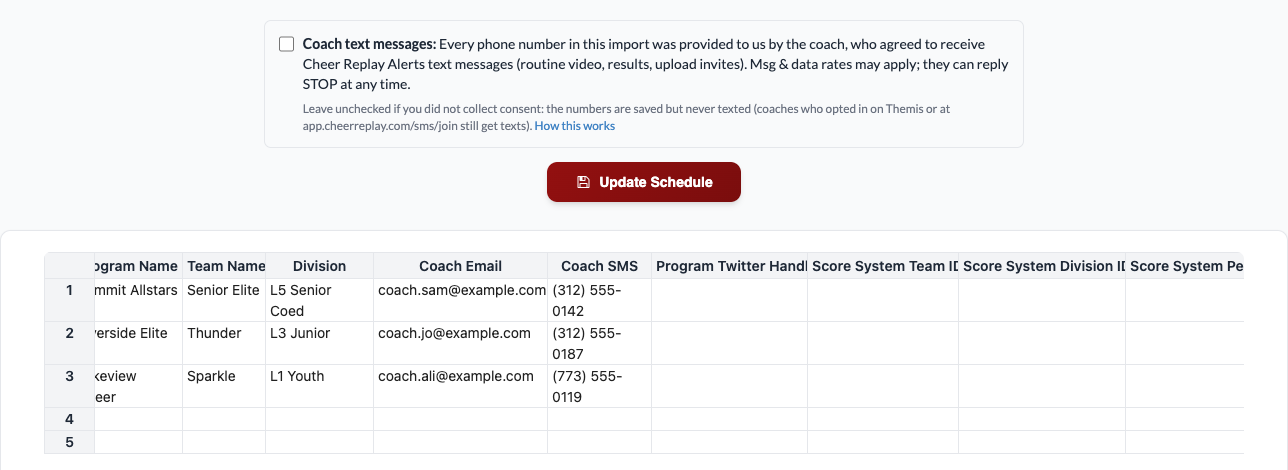
Schedule import screen (Coach SMS column, attestation box above Save). Tap to enlarge.
- Manual entry: an unchecked attestation box sits under the coach phone field:
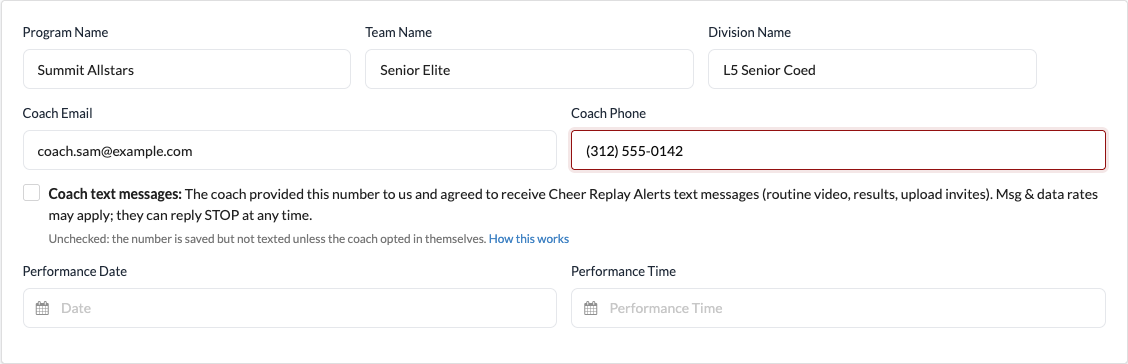
Adding a single team. The same box appears when a producer edits a video's coach phone. Tap to enlarge.

Editing a video's coach phone. Tap to enlarge.
- The attestation reads: “The coach provided this number to us and agreed to receive Cheer Replay Alerts text messages (routine video, results, upload invites). Msg & data rates may apply; they can reply STOP at any time.” (bulk version: “Every phone number in this import was provided to us by the coach, who agreed to receive Cheer Replay Alerts text messages (routine video, results, upload invites). Msg & data rates may apply; they can reply STOP at any time.”)
- Cheer Replay stores the attestation per number with the producer's user, the import, the time and the IP address.
- The first text to that number is the welcome message below, naming the event producer, so the coach knows why they are getting it and how to stop.
6Sample messages
Welcome (always the first message to a new number):
Upload invitation:
Routine video, results and score sheet:
Live feed link:
New-account upload invitation:
7STOP, HELP, START and support
- Reply STOP (or UNSUBSCRIBE, CANCEL, END, QUIT) to any message to opt out. You get one confirmation and no further messages.
- Reply HELP for help. The reply is:Cheer Replay Alerts: help at support@cheerreplay.com or +1 (415) 808-5255. Msg & data rates may apply. Reply STOP to opt out.
- Reply START or JOIN to opt back in.
- Support: support@cheerreplay.com or +1 (415) 808-5255. Replies to our texts reach Cheer Replay support.
- Msg & data rates may apply. Message frequency varies. Carriers are not liable for delayed or undelivered messages.
- No mobile information will be shared with third parties or affiliates for marketing or promotional purposes. Text messaging originator opt-in data and consent are not shared with any third parties.